





Managing virtual infrastructure becomes difficult when standard dashboards hide backend object details. This is where a Managed Object Browser (MOB) becomes useful. It gives administrators and developers direct visibility into infrastructure objects, methods, and API data that are normally hidden inside graphical interfaces.
In VMware environments, the Managed Object Browser is widely used for troubleshooting, API testing, automation development, and advanced configuration checks. Infrastructure teams often rely on it when the regular vSphere Client cannot expose enough technical detail.
At the same time, MOB access introduces security concerns. Because it can expose backend methods and infrastructure properties, many organizations either restrict or disable it entirely in production environments. Understanding both its capabilities and risks is essential before using it in enterprise systems.
What Is a Managed Object Browser?
A Managed Object Browser is a web-based interface that allows direct interaction with infrastructure objects managed by enterprise platforms. In VMware vSphere, MOB exposes backend objects through the vSphere API.
Instead of using visual menus, administrators can inspect object properties, relationships, methods, and internal IDs directly from the browser interface.
The concept is closely related to object-oriented infrastructure management. Every infrastructure component becomes a “managed object.” Examples include:
- Virtual machines
- ESXi hosts
- Datastores
- Networks
- Resource pools
- Clusters
- Tasks and events
This structure mirrors how APIs organize infrastructure internally.
For readers unfamiliar with object-oriented systems, the idea is similar to how objects work in Wikipedia’s object-oriented programming guide.
How Managed Object Browser Works
The MOB interface connects directly to backend management services. In VMware, it communicates with vCenter Server APIs and exposes object hierarchies through a browser.
A typical workflow looks like this:
- Administrator logs into MOB
- Browser loads infrastructure objects
- User navigates object references
- Properties and methods appear
- Specific actions or inspections are performed
One important component inside MOB is the Managed Object Reference (MoRef). These identifiers uniquely represent infrastructure objects.
For example:
vm-102may represent a virtual machinehost-14may represent an ESXi hostdatastore-31may represent storage resources
This becomes extremely useful during automation development because scripts often require exact object references.
The key difference between MOB and standard management dashboards is visibility. The vSphere Client simplifies management visually, while MOB exposes backend structure directly.
VMware vSphere Managed Object Browser Explained
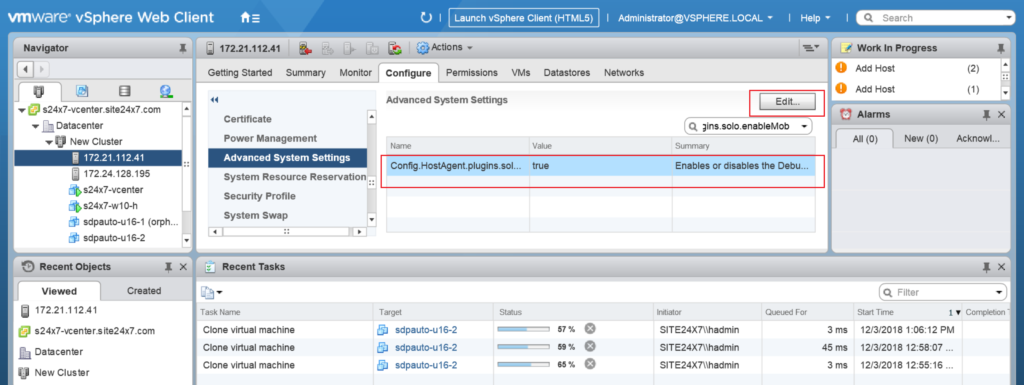
VMware’s MOB is one of the most widely known implementations. It is built into vCenter Server and ESXi systems.
Administrators commonly access it through URLs like:
https://vcenter-server/mobhttps://esxi-host/mob
Once authenticated, users can browse infrastructure objects and inspect detailed API-level information.
Common VMware MOB Use Cases
Finding Hidden Configuration Data
Some configuration details are not visible in the regular vSphere interface. MOB exposes these backend properties directly.
Troubleshooting Inventory Problems
Infrastructure synchronization issues can sometimes only be diagnosed through object inspection.
API Development and Testing
Automation engineers frequently use MOB to validate API methods before building scripts with PowerCLI or SDKs.
Retrieving MoRef IDs
Many automation workflows require exact object references. MOB simplifies locating them.
According to VMware ecosystem surveys and automation community discussions, PowerCLI and API-driven infrastructure management continue growing rapidly because enterprises increasingly automate virtualization operations.
Benefits of Using Managed Object Browser
MOB remains valuable because it solves problems that graphical tools cannot always handle efficiently.
Faster Infrastructure Troubleshooting
When virtual machines fail to appear correctly or inventory relationships break, backend object inspection helps isolate the issue faster.
Better API Visibility
Developers can explore object methods and parameters directly without relying only on documentation.
Useful for Automation Teams
Automation engineers often validate:
- Method responses
- Object relationships
- API permissions
- Property values
before writing production scripts.
Access to Advanced Infrastructure Details
MOB reveals backend data structures that standard dashboards intentionally hide to simplify user experience.
This deeper visibility is especially important in large enterprise environments.
Security Risks of Managed Object Browser
While MOB is powerful, it also increases administrative risk if improperly secured.
The main issue is direct backend access. Users with sufficient permissions can inspect or execute methods against infrastructure objects.
This creates several security concerns.
Unauthorized Access Risks
If management interfaces are exposed publicly, attackers may attempt credential-based access.
Industry reports consistently show that exposed management interfaces remain a major infrastructure security weakness.
Configuration Changes
Some MOB operations can modify backend infrastructure behavior directly.
Incorrect changes may impact:
- Virtual machine stability
- Storage mappings
- Networking
- Resource allocation
Exposure of Sensitive Data
MOB may reveal:
- Infrastructure topology
- Internal object references
- Datastore details
- Cluster structures
This information can help attackers understand enterprise environments more deeply.
Why Many Organizations Disable MOB
Security-focused organizations often disable or restrict MOB access because modern REST APIs and automation tools provide safer alternatives.
Production environments usually follow hardening policies that reduce unnecessary administrative interfaces.
How to Secure a Managed Object Browser
Security controls are essential when MOB remains enabled.
Restrict Administrative Access
Only authorized infrastructure administrators should have MOB access.
Role-based access control should be enforced strictly.
Use Multi-Factor Authentication (MFA)
MFA significantly reduces credential compromise risk.
Isolate Management Networks
Management interfaces should never remain exposed to the public internet.
Network segmentation helps protect infrastructure services.
Monitor Administrative Activity
Infrastructure logs should capture:
- Login attempts
- Method execution
- Configuration changes
- API activity
This improves incident response capabilities.
Keep Systems Updated
Outdated virtualization platforms increase security exposure.
VMware security advisories regularly address vulnerabilities related to infrastructure management components.
Managed Object Browser vs vSphere Client
| Feature | Managed Object Browser | vSphere Client |
|---|---|---|
| Access Type | Backend Object Access | Graphical Interface |
| Complexity | Advanced | Easier |
| API Visibility | High | Limited |
| Risk Level | Higher | Lower |
| Best Use Case | Troubleshooting & APIs | Daily Administration |
The vSphere Client is designed for operational simplicity. MOB targets advanced administration and development tasks.
This distinction matters because inexperienced users can unintentionally modify infrastructure settings through backend methods.
Common MOB Problems and Fixes
MOB Not Loading
Common causes include:
- Disabled MOB service
- SSL certificate issues
- Browser security restrictions
- Network connectivity problems
Authentication Errors
Permission problems often occur when users lack required API privileges.
Empty or Missing Objects
Inventory synchronization problems can prevent objects from appearing correctly.
Performance Issues
Large enterprise environments with thousands of objects may slow down MOB responses.
In these cases, administrators usually rely more heavily on APIs and automation frameworks instead of manual browser navigation.
Alternatives to Managed Object Browser
Modern infrastructure teams increasingly use alternative tools.
VMware PowerCLI
PowerCLI simplifies VMware automation using PowerShell commands.
vSphere REST APIs
REST APIs provide safer and more scalable automation access.
VMware SDKs
Developers commonly use:
- Python SDKs
- Java SDKs
- .NET SDKs
for enterprise integrations.
These tools reduce dependency on browser-based backend inspection.
Who Should Use Managed Object Browser?
MOB is most useful for:
- VMware administrators
- Infrastructure engineers
- Automation developers
- API integrators
- Virtualization support teams
It is generally not recommended for beginner administrators because backend methods can directly impact infrastructure behavior.
Final Thoughts
Managed Object Browser remains an important tool in VMware and enterprise virtualization environments. It provides visibility that standard graphical interfaces cannot always deliver.
For troubleshooting, API discovery, and automation validation, MOB continues to offer practical value. However, the same backend access that makes it useful also increases operational and security risks.
Organizations using MOB in production environments should apply strict access controls, isolate management networks, and follow infrastructure hardening practices.
As enterprise infrastructure automation continues expanding, REST APIs and SDK-based management are becoming more common. Even so, Managed Object Browser still plays an important role for advanced troubleshooting and backend visibility in modern virtualized environments.






[…] SWAN infrastructure is evolving with modern networking technologies. […]