



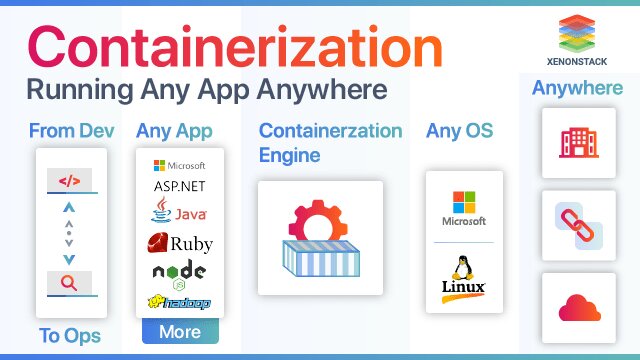

Containerization technologies package applications with all their dependencies into isolated, portable units. These units share the host operating system kernel instead of carrying a full OS. In 2026, this approach powers most production workloads.
Docker adoption sits at 92% among IT professionals, up 17 points from the previous year. Kubernetes runs in production for 82% of container users, up sharply from 66% in 2023. Containerd handles 74% of runtime needs in cloud-native environments.
These numbers matter because they fix real pains. Developers stop hearing “it works on my machine.” Teams deploy faster, cut costs, and secure apps better than with virtual machines or bare metal.
The main technologies include Docker for local development, Podman for daemonless security, containerd and CRI-O as lightweight Kubernetes runtimes, and LXC for system-level containers. Orchestration comes mainly from Kubernetes, with Docker Swarm or Nomad as lighter options.
This guide walks through each one. It compares them directly, shows exact use cases, and gives step-by-step fixes for common problems you face today.
Containerization vs. Virtualization and Serverless: Which Solves Your Specific Pain Points?
Virtual machines waste resources. Each VM runs its own full operating system. Containers share the host kernel. That difference means containers start in under a second and use 5–10 times less memory.
Here’s the practical breakdown. VMs give strong isolation but slow startup and high overhead. Serverless hides infrastructure but locks you into one vendor. Containers give you full control, portability across clouds, and no “black box” surprises.
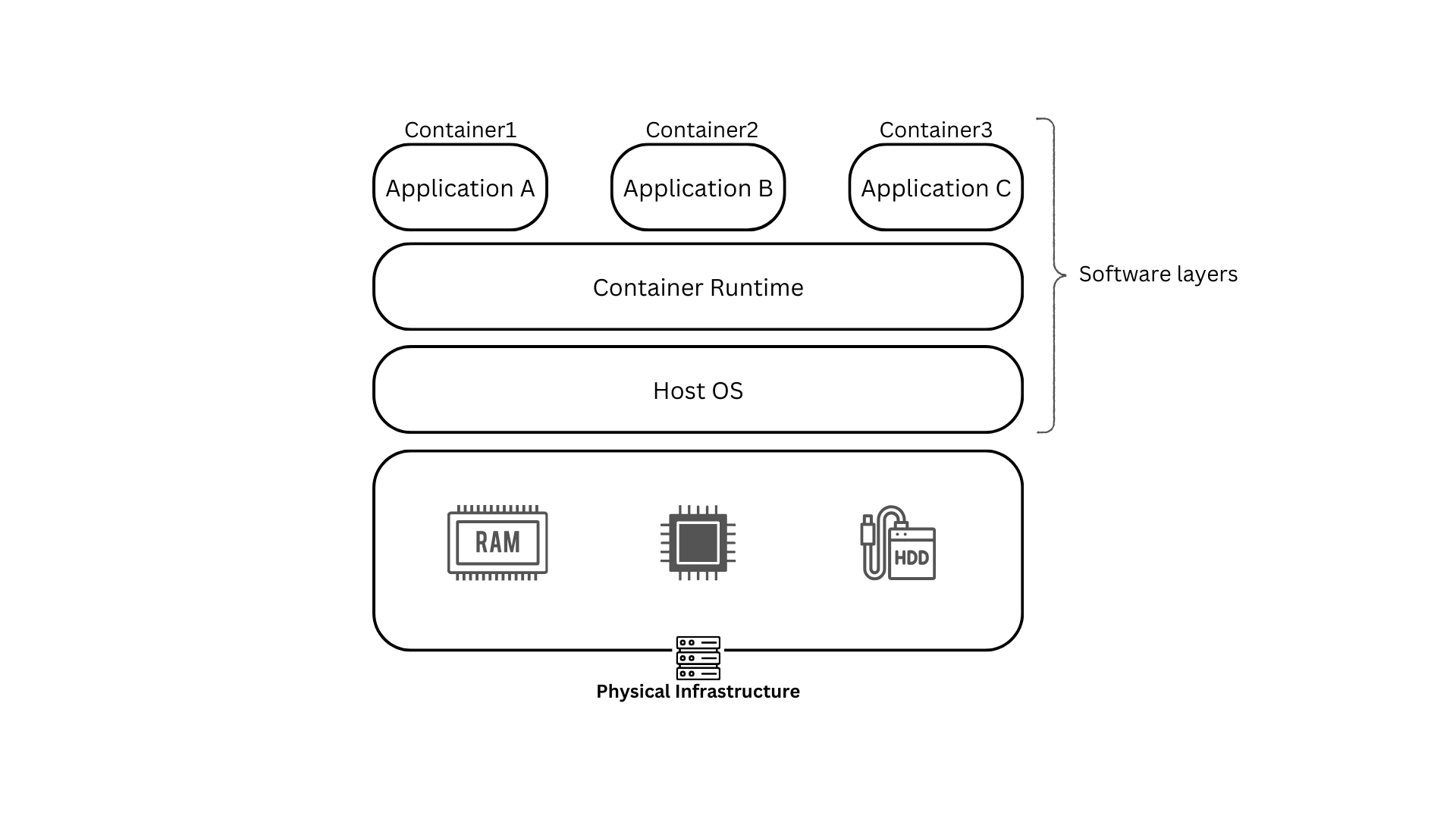
Containers vs Virtual Machines (VMs): See the Difference | Wiz
Choose containers when you need consistent environments across dev, test, and prod. Pick VMs for legacy apps that require an entire OS. Use serverless only for short-lived, event-driven tasks.
How Containerization Technologies Work: Architecture Layers (With 2026 Updates)
The stack starts with hardware and the host OS. Above that sits the container runtime—containerd, CRI-O, or runc. It manages OCI-standard images that bundle your app and dependencies.
The OCI format ensures images run anywhere. No more environment mismatches. In 2026, eBPF improves networking and security inside these layers. Wasm containers extend the model to edge devices with even lower overhead.
Build once with a Dockerfile or Containerfile. Run anywhere. That simple flow eliminates 70% of deployment bugs reported in mixed environments.
Core Benefits with Quantified Problem-Solving Impact
Portability ends “works on my machine” issues in CI/CD pipelines. Efficiency lets you pack 5–10x more workloads on the same hardware. Fault isolation keeps one crashing container from taking down others.
Scaling happens without downtime. Rolling updates and auto-healing are built in. Real migrations show 40% lower infrastructure bills once teams containerize legacy apps.
Security improves with rootless runtimes and image scanning. You reduce the attack surface compared to traditional setups.
Top Containerization Technologies in 2026: Detailed Comparison & When to Use Each
Docker remains the developer favorite for its CLI familiarity and ecosystem. It works great for quick local testing. The daemon adds slight overhead in production.
Podman runs daemonless and rootless by default. It uses the same commands as Docker but improves security and Kubernetes integration. Teams avoid privileged daemons entirely.
containerd powers 95% of Kubernetes clusters as the default lightweight runtime. Its 30 MB footprint and minimal features make it ideal for production.
CRI-O focuses purely on Kubernetes. It delivers the lowest overhead and tightest security policies in OpenShift environments.
LXC suits apps that need a full Linux environment inside the container.

Docker vs Podman: Which Container Engine to Use in 2025? | Giridhar Vedula posted on the topic | LinkedIn
Quick decision matrix
- Local dev workstation → Docker or Podman
- Enterprise production on Kubernetes → containerd or CRI-O
- Security-first Linux teams → Podman
- Legacy multi-process apps → LXC
Pick based on your workload. Most teams now run Docker locally and containerd in production for the best of both worlds.
Container Orchestration Technologies: Managing at Scale
Kubernetes dominates. It handles auto-scaling, service discovery, and rolling updates across thousands of containers. Managed options like EKS, AKS, or GKE remove the control-plane headache.
Docker Swarm offers simple clustering for smaller setups. Nomad fits teams that already use HashiCorp tools. OpenShift adds enterprise features on top of Kubernetes.
The real value appears during traffic spikes. Kubernetes detects failing pods and replaces them instantly. You avoid manual intervention and downtime.
Real-World Use Cases & Problem-Solving Applications
Microservices teams break monoliths into independent containers. Each service scales separately. One large retailer cut release cycles from weeks to hours this way.
Cloud migrations lift legacy apps with minimal changes. Lift-and-shift works because containers carry everything they need.
Edge and IoT deployments use lightweight runtimes. Containers run reliably on resource-constrained devices.
Common Challenges & Proven Fixes with Containerization Technologies
Security remains the top concern because containers share the kernel. Fix it with rootless runtimes, Trivy or Grype scanning in CI/CD, and Falco for runtime detection.
Resource contention hits when “noisy neighbor” containers steal CPU. Set cgroups limits and monitor with Prometheus.
Debugging feels complex at first. Podman’s generate kube command plus centralized logging solves most issues fast.
Use this checklist:
- Scan every image before deploy.
- Run rootless where possible.
- Apply network policies.
- Set resource requests and limits.
- Test failure scenarios in staging.
Container Security Best Practices (2026 Edition)
Shared-kernel designs create specific risks. Supply-chain attacks on images are real. Shift-left scanning catches them early.
Podman and containerd reduce the attack surface compared with older Docker daemons. Zero-trust network policies and runtime monitoring complete the picture.
Step-by-Step Migration Guide to Containerization Technologies
Start by assessing current apps. Identify dependencies and stateful components.
Choose your runtime based on the matrix above. Build images with multi-stage Dockerfiles to keep them small.
Test locally, then in a staging Kubernetes cluster. Monitor resource usage and logs.
Common pitfalls include missing volume mounts or hardcoded paths. Always include a rollback plan—keep the old VM deployment ready for 48 hours.
Tools like AWS App2Container speed up the process for Java and .NET apps.
Future Trends in Containerization Technologies (2026–2028)
AI-driven orchestration will auto-tune resources. Wasm containers will dominate edge and browser workloads. Efficiency gains support greener computing goals.
Prepare now by adopting OCI standards and testing rootless runtimes.
How to Choose the Right Containerization Technology: Decision Framework
Answer these questions:
- Team size and skill level?
- Workload type—stateful or stateless?
- Compliance requirements?
- Budget for managed services?
Small teams start with Podman and Docker Desktop. Larger enterprises go straight to containerd plus Kubernetes.
Conclusion & Next Steps
Containerization technologies deliver portable, efficient, and secure deployments in 2026. The right choice depends on your exact pain points and environment.
Start small. Try Podman on your laptop today if security matters. Move to containerd in your next Kubernetes project if you run production clusters.
You now have the comparison data, migration steps, and fixes that actually work. Apply them and measure the difference in your next deployment.
FAQ
Docker vs. Podman in 2026? Docker leads in familiarity. Podman wins on security and daemonless operation. Many teams use both.
Is Kubernetes required? No. Use it only when you need orchestration at scale. Simple apps run fine with plain Docker or Podman.
Best for Windows apps? Windows Containers work with Docker. For Linux workloads on Windows hosts, WSL2 plus Podman is smoother.
Cost implications? Containers typically cut infrastructure bills by 30–50% versus VMs once fully adopted.
Security differences? Rootless runtimes like Podman reduce privilege escalation risks. Always combine with image scanning.
For more background on the core concept, see the Containerization (computing) entry on Wikipedia.




[…] Recently used tools […]