
What Is Latency?
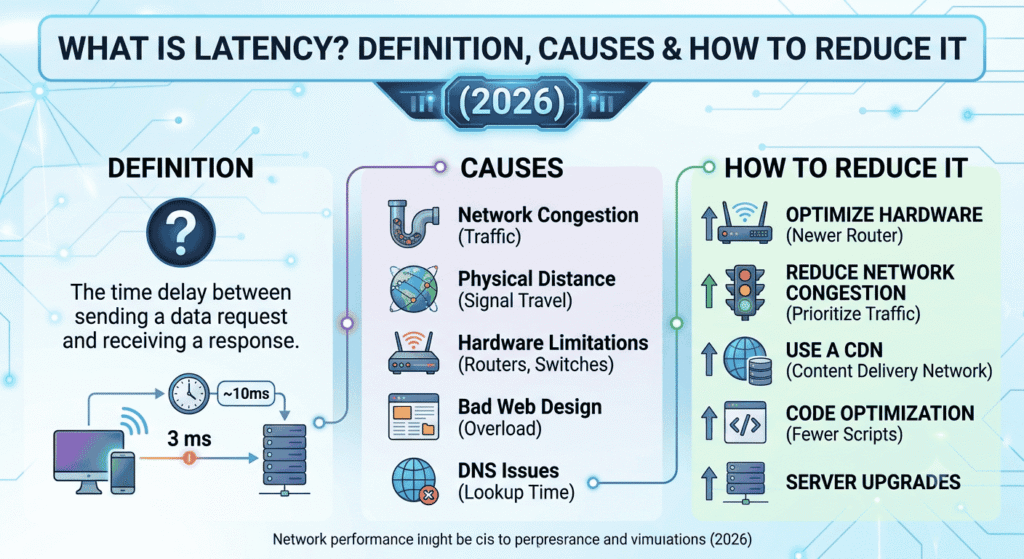
Latency is the time delay for a data packet to travel from its source to its destination across a network, typically measured in milliseconds (ms). It represents the round-trip time (RTT) for a request to reach a server and return with a response. Low latency (under 50ms) delivers responsive experiences in web browsing, gaming, video calls, and cloud applications, while high latency causes lag, buffering, and frustration.
People also Read : The Complete Guide to Technology Solutions Professional (2026)
Understanding Latency in Modern Networks
Latency affects every online interaction. In 2026, with AI-driven apps, real-time collaboration, and immersive gaming/metaverses demanding sub-20ms responses, mastering latency separates competitive platforms from frustrating ones.
Key Types of Latency
- Network Latency: Delay in data transmission over networks, including internet, LAN, or WAN.
- Application Latency: Time for software to process requests, often including database queries or API calls.
- System/Input Latency: Delays in hardware/software response, common in gaming (e.g., input lag).
- Propagation Latency: Time for signals to travel physical distance (limited by speed of light).
- Processing/Queuing Latency: Time spent in routers, switches, or servers handling/queuing packets.
Latency vs. Bandwidth vs. Throughput
Many confuse these terms. Here’s a clear comparison:
| Metric | Definition | Measured In | Example Impact | Highway Analogy |
|---|---|---|---|---|
| Latency | Delay for data to travel | Milliseconds (ms) | Time for first byte to arrive | How fast the car travels |
| Bandwidth | Maximum data volume per second | Mbps / Gbps | Total “lanes” on the highway | Number of lanes |
| Throughput | Actual data successfully transferred | Mbps / Gbps | Real traffic flow after congestion | Actual cars passing per minute |
High bandwidth with high latency still feels slow (e.g., large downloads start after a delay). Low latency with moderate bandwidth often feels snappier for interactive tasks.
What Causes High Latency?
Understanding root causes enables targeted fixes. Primary factors include:
- Physical Distance: Signals travel at ~186,000 miles/second in fiber, but real-world paths add hops. Cross-continental connections add 100-200+ ms.
- Network Congestion: Too many users/devices overload routers/switches, causing queuing delays.
- Hardware/Transmission Medium: Wi-Fi introduces interference; old routers or poor cabling add delays. Satellite internet suffers high latency due to space travel.
- Routing and Hops: Data passes through multiple routers; each adds processing time.
- Protocol Overhead: TCP handshakes, encryption (TLS), and error correction add layers.
- Server-Side Processing: Slow databases, unoptimized code, or overloaded servers increase TTFB (Time to First Byte).
PAA: What is a good latency? Under 20ms is excellent (competitive gaming). 20-50ms is good for most uses (web, video calls). 50-100ms is acceptable but noticeable. Over 150ms feels laggy.
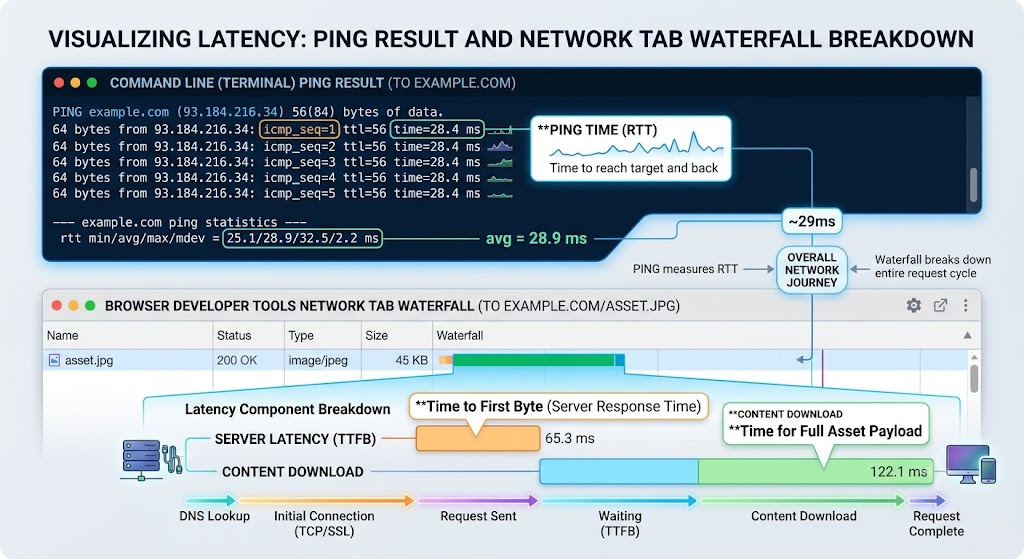
PAA: How is latency measured? Use tools like ping (ICMP), traceroute, or browser dev tools (Network tab). Round-trip time (RTT) is standard. Advanced monitoring uses synthetic probes or real-user metrics (RUM).
The Impact of Latency on User Experience and Business
High latency directly hurts metrics:
- Web Performance: Each extra 100ms delay can reduce conversions by ~7% (historical Amazon data). Google prioritizes speed in rankings.
- Gaming: Input lag ruins precision; sub-30ms is ideal for FPS titles.
- Video/Streaming: Buffering frustrates users; low latency enables real-time interactions (e.g., live auctions, remote surgery).
- Business: Slow internal apps reduce productivity. E-commerce sites with high latency see higher bounce rates.
- SEO: Core Web Vitals (including LCP, FID) factor in perceived load times influenced by latency.
In AI applications, latency determines responsiveness of chatbots or inference engines.
How to Measure Latency Effectively
- Basic Ping Test: ping google.com in terminal/command prompt. Note average RTT.
- Traceroute/MTR: Identifies hop-by-hop delays.
- Browser Tools: Chrome DevTools > Network panel shows waterfall charts with DNS, TCP, TTFB.
- Speed Tests: Ookla, Fast.com, or Cloudflare tools provide latency readings.
- Advanced: Use Wireshark for packet analysis or application performance monitoring (APM) tools like New Relic/Datadog.
How to Reduce Latency: Proven Strategies
Reducing latency involves client, network, and server optimizations. Follow these steps:
- Use Wired Connections: Switch from Wi-Fi to Ethernet. Eliminates wireless interference and typically cuts 10-30ms.
- Choose Closer Servers/CDNs: Use Content Delivery Networks (e.g., Cloudflare, Akamai) to cache content at edge locations nearer to users. Can reduce latency by 50%+.
- Optimize Routing: Select ISPs with good peering. Use VPNs cautiously (some add latency; gaming-optimized ones minimize it).
- Upgrade Hardware: Modern routers with QoS, faster NICs, and low-latency switches. Avoid old Wi-Fi standards.
- Reduce Congestion: Limit background downloads, use QoS to prioritize traffic, or upgrade internet plan.
- Web Optimization Techniques:
- Minimize HTTP requests.
- Enable browser caching.
- Compress assets and use lazy loading.
- Reduce TTFB with server-side caching (Redis) and efficient code.
- Protocol Improvements: HTTP/3 (QUIC) reduces connection setup time. Implement edge computing for critical apps.
- Gaming-Specific: Close background apps, use wired peripherals, optimize router settings (enable gaming mode), choose low-ping servers.
- Monitor and Iterate: Set up continuous monitoring and alert on spikes.
PAA: Does restarting router reduce latency? Yes, temporarily—it clears temporary congestion, resets connections, and can resolve minor issues. Not a permanent fix for underlying problems.
PAA: How does distance affect latency? Roughly 1ms per 100-150 miles (one way) in optimal fiber, plus routing overhead. This is why global teams use multi-region deployments.
Advanced Latency Optimization Techniques
For enterprises and developers:
- Anycast Routing: Routes users to nearest server instance.
- Zero-Trust Networks with Optimized Security: Modern solutions minimize TLS overhead.
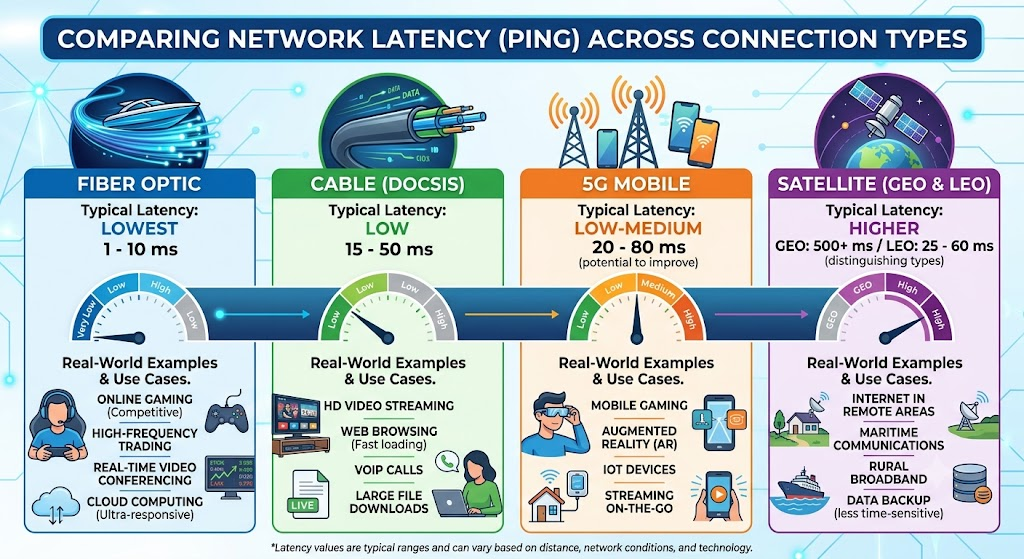
- Fiber vs. Copper vs. 5G/Starlink: Fiber offers lowest latency; satellite improves but remains higher.
- Kernel and OS Tuning: Adjust TCP buffers, interrupt coalescing.
- AI-Driven Network Management: Predictive routing and congestion avoidance.
Statistics: Studies show CDNs can cut global latency by 30-60%. Edge computing brings processing under 10ms in many cases.
Common Myths About Latency
- Myth: More bandwidth always fixes latency. Reality: Bandwidth helps throughput but not inherent delays.
- Myth: All Wi-Fi is bad. Reality: Modern Wi-Fi 6E/7 with good signal is close to wired for many uses.
- Myth: It only matters for gaming. Reality: It impacts every real-time or interactive experience.
Latency in Emerging Technologies (2026 Perspective)
- 5G and Beyond: Promises <10ms, enabling AR/VR and autonomous systems.
- Edge AI: Processes data locally to slash round-trips.
- Satellite Networks: Improving but still lag terrestrial options.
- Web3/Metaverse: Ultra-low latency critical for seamless immersion.
Tools and Resources for Latency Management
- Free: Ping, Traceroute, Google PageSpeed Insights.
- Paid: Cloudflare Observatory, Catchpoint, ThousandEyes.
- Developer: WebPageTest.org, Lighthouse audits.
Conclusion: Prioritize Latency for Superior Performance
It isn’t just a technical metric—it’s a user experience and business differentiator. By understanding its causes and implementing systematic reductions, you can deliver faster, more reliable digital experiences. Start with basics (wired connection, CDN) and scale to advanced optimizations. Regularly test and monitor to maintain low latency as traffic and applications evolve. More on Wikipedia.