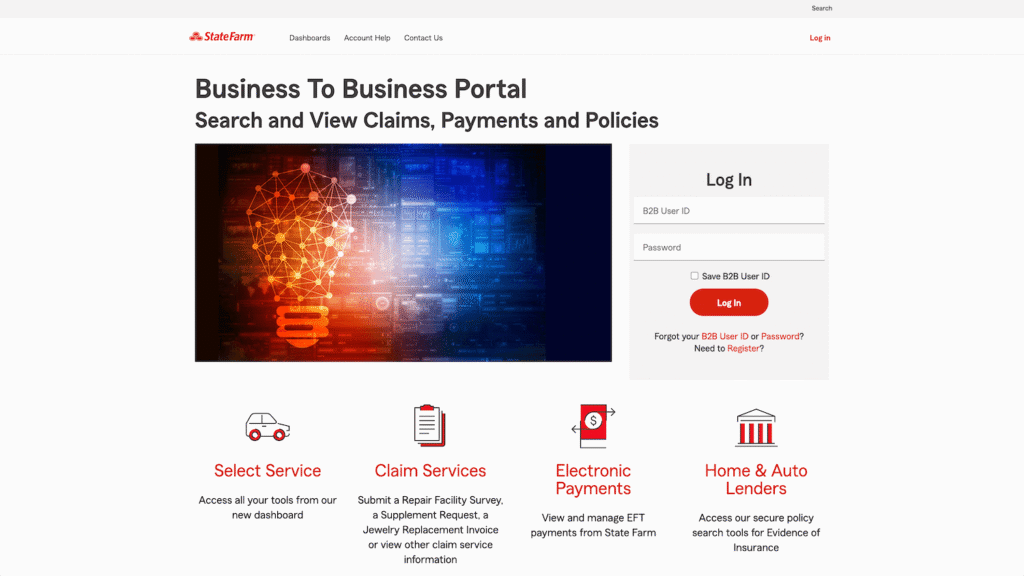

The State Farm B2B portal is a dedicated dashboard for third-party vendors to process claims, submit vehicle repair supplements, and receive electronic payments. Auto repair shops, medical providers, and lenders use this platform to bypass manual paperwork and connect directly with the Estimatics Unit. Success on this platform requires a registered B2B ID, accurate claim formatting, and properly configured Electronic Funds Transfer (EFT) settings.
State Farm currently serves over 96 million policies and accounts, making efficient claim routing critical for your business cash flow. Submitting a flawless virtual supplement request prevents kickbacks, while EFT enrollment ensures non-medical payouts clear in just one to three days. Medical claim payments process within five days of the payment date.
If you do not have login credentials, you can still submit a State Farm B2B vehicle repair supplement request form using the “No Login Required” links on the home page. However, registering for full access unlocks the ability to track Explanation of Review (EOR) documents and manage historical claim data. Understanding your specific access level is the first step to mastering this system.
Navigating these access levels starts with identifying your exact business type and what tools you are authorized to use.
Who Needs Access to the State Farm B2B Portal?
The platform segments users into highly specific categories based on the services they provide. You need to ensure you are operating in the correct environment.
- Auto Repair Shops (Select Service®): This section is for handling vehicle supplements and managing your shop profile. You can also access RPM reports and the ADAS Calibration program.
- Medical Billers & Lenders: This area is for routing Health or Property & Casualty claims, managing mortgage billing, and handling Electronic Data Interchange (EDI) transactions.
- Suppliers & Rental Providers: This tab links out to the Coupa resource portal for supplier engagement and allows rental providers to review claim information.
Knowing where you fit is easy, but correctly filing the actual paperwork is where most vendors hit unnecessary delays.
How to Accurately Fill Out the State Farm B2B Form (Supplement Request)
The State Farm B2B Form acts as the communication bridge between your repair facility and the insurance adjusters. Accuracy here dictates how fast you get paid.
Step 1: Requesting Shop & Vehicle Info
The portal requires exact data matches. When validating a claim, you must input the exact Claim Number, Vehicle Year, and Vehicle Make. If your shop address triggers an “Address Standardization” pop-up, always choose the “Standardized” option unless it is factually incorrect.
Step 2: The Supplement Information Section
When detailing the repair specifics, you must accurately input data across the mandatory columns. These include Repair vs. Replace, Description, Price, Labor Hours, Ref Hours, and Paint/Material. Do not leave required fields blank, or the system will reject the submission.
Step 3: Confidentiality & Approvals
Before finalizing, you must navigate the “Comments Approval” segment. You are required to acknowledge the strict “Notice Private and Confidential” warnings to ensure the data remains secure.
Portal vs. Manual Upload
Using the “Create New Supplement” button in your digital dashboard is vastly superior to filling out a PDF. The digital portal cross-references State Farm’s database instantly, catching errors before they cause a week-long delay.
Once your form is submitted accurately, you need to know how to track its progress through the system.
Navigating the B2B Supplement Dashboard
Your dashboard is designed to limit time spent searching for updates. The tools here are straightforward if you know where to look.
- Locating Recent Claims: Use your Supplement Dashboard Homepage to find any virtual supplement requests submitted within the last 30 days.
- Claim Details Page: Click into individual claims to view previously approved estimate versions. This page will also show you if payments have been issued to your business.
- The “No-Login” Workaround: If you are locked out, you can still work. You can request a supplement or use the fire service provider tool directly from the B2B homepage without full login credentials.
Tracking a claim is great, but getting the funds deposited into your bank account is the ultimate goal.
Setting Up EFT/EDI for Faster Payouts
Paper checks get lost in the mail. Setting up electronic payments eliminates that risk entirely.
- ERA/EFT Enrollment: Navigate to the “Electronic Payments” tab on the main portal. Click on “EFT forms” for non-medical vendors, or “P&C medical EFT forms” for medical vendors. Note that only an Administrator on your account will have access to these links.
- View Remittance: To track when a payment clears, use the View Remittance tool. You will need to click on specific zip codes to see payments issued under your Tax ID Number.
Even with a perfect setup, software glitches and user errors still happen. Here is how to fix them quickly.
Troubleshooting Common B2B Portal Errors
Do not let a simple portal error slow down your workflow. Most issues can be resolved without calling support.
- “Claim Not Found” Error: This usually happens during claim validation. Ensure you are looking at the initial State Farm estimate and entering the exact Claim Number, Vehicle Year, and Vehicle Make.
- Cannot Find a Payment: If you click “View Remittance” and see nothing, you may need to use the Ctrl-F function to manually search for your zip code. If it is still missing, log out, clear your browser cookies, and log back in.
- Missing EOR (Explanation of Review): If you handle Workers’ Compensation claims, those EORs are not visible online. State Farm mails them to you. For non-work comp claims missing an EOR after three days, contact the Help Desk.
- Account Lockouts: If your B2B ID is locked, use the recovery links. For persistent admin issues, you can call the B2B Help Desk directly at 855-311-2681.
For any remaining issues, reviewing the most common questions can save you a phone call.
Frequently Asked Questions
How do I submit a supplemental claim to State Farm without a B2B account?
Go to the B2B homepage and look for the “No login required” section. Click “Request supplement,” enter your shop contact information, and validate the claim using the customer’s claim number and vehicle details.
What is a State Farm B2B form used for?
It serves as a standardized communication bridge. It allows repair shops, medical providers, and vendors to submit precise estimates and repair details directly to the Estimatics Unit for approval.
How do I contact State Farm B2B support?
For portal navigation, password resets, or missing payments you cannot locate, you can contact the dedicated B2B Help Desk at 855-311-2681.