
Global Active Device, or GAD, lets organizations run mission-critical applications without worrying about storage downtime. It creates a single virtual volume that spans two physical Hitachi Virtual Storage Platform (VSP) systems. Both systems accept read and write operations simultaneously, keeping data fully synchronized in real time.
This active-active approach differs sharply from traditional active-passive replication. When one storage array experiences an issue, servers continue I/O to the other array seamlessly. No application restart. No manual failover in most cases.
Quick Summary for Decision Makers
- Synchronous mirroring across metro distances (typically under 100km, depending on latency).
- Quorum device (on-premise disk or cloud VM) prevents split-brain scenarios.
- Integrated multipathing handles path optimization automatically.
- Supports SAN and NAS workloads on compatible VSP platforms.
Enterprises in finance, healthcare, and manufacturing use GAD to meet strict RTO/RPO goals close to zero. It eliminates the downtime window common in older disaster recovery setups.
People Also Explore : The Complete Guide to Computer Vision News
How Global Active Device Works – Core Architecture and Data Flow
GAD builds on Hitachi Storage Virtualization Operating System (SVOS). It pairs two storage systems into a GAD pair. One acts as the primary (often called Main Control Unit or MCU), but both can service I/O.
A virtual storage machine (VSM) presents the paired volumes as one consistent device to hosts. Data written to one system replicates synchronously to the other. Hosts use standard multipathing software to access optimized paths.
The quorum disk plays a critical role. It acts as a tiebreaker when communication between the two arrays fails. Both systems check the quorum to decide which copy remains active. Modern setups often use Hitachi’s Global-Active Device Cloud Quorum on AWS or Azure. This removes the need for a dedicated third-site physical disk and speeds deployment.
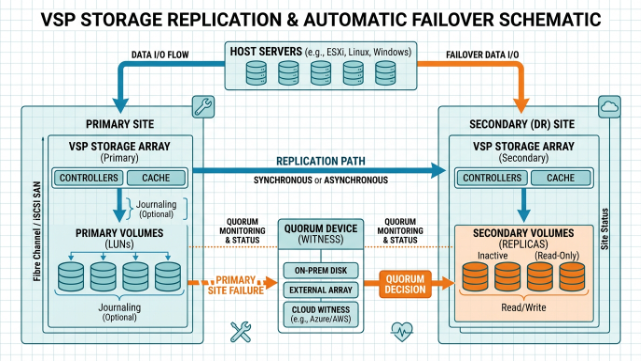
Data flow stays simple. A host writes to the GAD volume. The storage system commits the write locally and replicates it to the paired volume. Once both confirm, the host receives acknowledgment. Latency remains low within metro distances because of dedicated fiber links and efficient replication engines.
Key Benefits of Implementing Global Active Device
GAD delivers measurable improvements in availability and operational flexibility. Organizations report near-zero unplanned downtime for storage-related events. Load balancing becomes possible by migrating workloads between sites without interrupting applications.
Unlike traditional synchronous replication that often requires complex scripting and longer recovery times, GAD automates many processes. Failover happens at the storage layer transparently for many workloads. Servers see continuous access even if one entire array goes offline.
Comparison with Traditional Replication Methods
Standard Hitachi Universal Replicator (HUR) or other async solutions focus on disaster recovery over longer distances but introduce recovery point objectives (RPO). GAD targets RPO=0 and RTO near zero for metro setups.
Active-passive clusters need full server failover, which adds minutes of downtime and potential data inconsistencies. GAD keeps the same volume identity across sites, simplifying clustering software configuration for databases like Oracle, SQL Server, or SAP.
Performance gains come from distributed I/O. Reads and writes distribute naturally across both arrays, improving throughput for high-demand applications.
Step-by-Step Implementation Guide for Global Active Device
Successful GAD deployments start with solid planning. Verify latency between sites stays under recommended thresholds—typically single-digit milliseconds. Ensure sufficient bandwidth on inter-site links, usually 10Gbps+ fiber.
Prerequisites and Planning
Both storage systems need compatible VSP One or similar models with GAD licenses. Configure remote paths between arrays. Decide on quorum placement—cloud options simplify this for many teams.
Create virtual storage machines on both systems. Map host groups and ports correctly so servers see consistent LUNs.
Configuration Using Hitachi Ops Center
Ops Center Administrator provides a guided workflow. Provision volumes, create GAD pairs, and set consistency groups for related datasets. The interface reduces manual CLI work significantly.
Test failover scenarios in a maintenance window. Validate that hosts continue I/O after simulated array failure. Monitor replication health through Ops Center dashboards.
Setting Up Cloud Quorum for Simplified Deployments
Cloud quorum removes physical hardware dependencies. Deploy the pre-configured VM image on AWS or Azure. It handles heartbeat and arbitration automatically. This approach cuts setup time from hours to minutes in many cases.
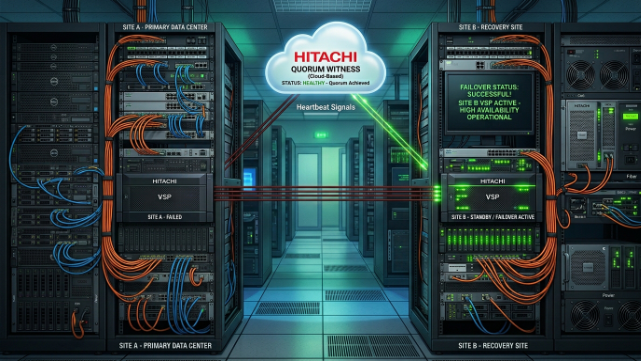
This visual shows how cloud quorum integrates into a distributed GAD architecture, making high availability accessible without extra on-prem infrastructure.
Common Troubleshooting Scenarios and Best Practices
Even well-designed setups encounter issues. Common problems include path failures, quorum connectivity loss, or unexpected high latency.
Handling Failover and Failback
Monitor GAD pair status regularly. When a site fails, the surviving array takes full load automatically in most configurations. Once the failed system recovers, perform controlled failback to restore balance. Use Ops Center Protector for advanced orchestration.
Performance Tuning and Monitoring
Tune buffer credits on fiber channel links. Align workload patterns so one site does not become a bottleneck. Set alerts for replication lag or high I/O queue depths.
Best practice includes separating replication traffic from production data paths where possible. Regular health checks on consistency groups prevent partial sync issues.
Avoiding Pitfalls in Multi-Site Setups
Do not stretch GAD beyond supported distances and latency limits. Overly aggressive load balancing without proper host multipathing can cause performance jitter. Always test with real application workloads before production cutover.
When to Choose GAD and Future Considerations
Choose GAD when your business cannot tolerate even brief storage outages. It fits environments with clustered applications that benefit from shared volume access across sites. Integration with platforms like IBM PowerVC, Commvault, and major hypervisors extends its value.
Integration with Backup and Virtualization Platforms
GAD pairs work alongside snapshot and backup tools. You can create consistent point-in-time copies without disrupting active mirroring. Virtualization layers see GAD volumes as standard devices, simplifying management.
Cost and ROI Analysis
Initial investment covers licenses, inter-site connectivity, and training. Returns come from reduced downtime costs, simplified operations, and better hardware utilization. Many organizations see payback within 12-18 months through higher application uptime and operational efficiency.
Conclusion – Building Resilient Storage Infrastructure
Global Active Device represents a practical evolution in enterprise storage. It shifts the focus from recovery after failure to continuous operation through failure. By maintaining active copies across systems and automating key processes, GAD helps teams deliver the reliability modern applications demand.
Organizations implementing GAD properly gain a strong foundation for hybrid and multi-site strategies. As data volumes grow and availability expectations rise, technologies like this become essential rather than optional. Start with a thorough assessment of your current storage pain points and latency capabilities to determine the right fit. With careful planning and testing, GAD delivers the always-on experience that keeps critical business processes running smoothly.